Appearance
Challenges
What the person sees. Instagram interrupts a request with a challenge: a security code to enter, a captcha to solve, a notice to acknowledge. The Simulator models each step as a screen that the server brings over the screen in front. A challenge screen is reached from nothing and has no back(): the person cannot leave a challenge without answering it. Each action answers the next step or the challenge's end. Inside an AndroidIgpapi call a challenge is answered by otherwise and the interrupted effect runs again (Challenges: answer them once with otherwise); OpenChallenge — the other way a challenge is opened, by a program that composes the AndroidApp layer itself — never retries the action, so there the caller takes it again on the screen that comes back.
A step the Simulator does not model is the typed ChallengeStepNotModelledError.
A challenge is not something a person starts. Inside an entry the screens bring it up themselves — over the start or over any effect they run in main — and describe each screen of it in otherwise (scenario 2, and Challenges: answer them once with otherwise). A program that composes the AndroidApp layer itself has no entry and no otherwise: it catches the checkpoint error once and opens the challenge with OpenChallenge (scenario 1). The other scenarios are programs from a step to its result: each takes the step you hold (ChallengeOutcome, what every action answers) and acts if it is the screen it expects. Each is the body of that screen's branch: in your constant it reads defineOtherwise({ [ChallengeVerifyCodeScreen.id]: screen => screen.submitCode(code) }). otherwise chains the steps by itself until the challenge closes, and the complete constant, with a branch for every screen that has an action, is in Challenges: answer them once with otherwise.
The examples answer no errors, so that each one stays on its path. A step can fail with IgChallengeNavigationVerifyCodeInvalidCodeError (a wrong code) or IgChallengeNavigationSetNewPasswordTooEasyError (a password that is too easy); every typed error has a row in Errors, and a step the Simulator cannot answer is ChallengeStepNotModelledError.
ts
import {
  AndroidIgpapi,
  ChallengeAccountSuspendedScreen,
  ChallengeAccountTemporarilyLockedScreen,
  ChallengeAddBirthdayScreen,
  ChallengeAuthenticityWizardScreen,
  ChallengeAwaitingReviewScreen,
  ChallengeClosed,
  ChallengeClosedBeforeLaunch,
  ChallengeContactPointCodeScreen,
  ChallengeEscalationInformationScreen,
  ChallengeLoginReviewScreen,
  type ChallengeOutcome,
  ChallengeRecaptchaScreen,
  ChallengeReviewContactPointChangeScreen,
  ChallengeScrapingWarningScreen,
  ChallengeSelectVerifyMethodScreen,
  ChallengeSetContactPointScreen,
  ChallengeSetNewPasswordScreen,
  ChallengeSubmitPhoneScreen,
  ChallengeTextCaptchaScreen,
  ChallengeThanksForProvidingInfoScreen,
  ChallengeVerifyCodeScreen,
  ChallengeWebRecaptchaScreen,
  ChallengeWebSetNewPasswordScreen,
  FeedTimelineScreen,
} from '@igpapi/android';
import { Effect } from 'effect';
import { readFile } from 'node:fs/promises';

// A checkpoint read back from your storage (see "Keep a session").
const saved = JSON.parse(await readFile('session.json', 'utf8'));
The matrix
| # | The person... | Starts on | Actions | Result |
|---|---|---|---|---|
| 1 | Has an action interrupted by a challenge | any screen | the action, written as the success path: otherwise answers the challenge (Challenges: answer them once with otherwise) | main goes on with the action's result; no catchTag('IgCheckpointError') |
| 2 | Starts the app and meets a challenge | any entry | otherwise (Challenges: answer them once with otherwise) | The next challenge step, then the expected screen, then main |
| 3 | Chooses where the code goes | select-verify-method | chooseVerificationMethod('email') | The code entry, or the next step |
| 4 | Enters the security code | verify-code | submitCode(code) | The next step, or the challenge's end |
| 5 | Asks for another security code | verify-code | resendCode() | The same screen; the person types the code that arrives |
| 6 | Goes back one step inside the challenge | verify-code | goBackToPreviousStep() | The step the server answers with |
| 7 | Gives a phone number | submit-phone | submitPhoneNumber(phoneNumber) | The next step, usually the code entry |
| 8 | Sets a new password | set-new-password | submitNewPassword(password) | The next step, or the challenge's end |
| 9 | Gives their age | add-birthday | submitAge(age) | The next step, or the challenge's end |
| 10 | Confirms a login was theirs | login-review | confirmItWasMe() | The next step, or the challenge's end |
| 11 | Reports a login was not theirs | login-review | reportItWasNotMe() | The next step, or the challenge's end |
| 12 | Acknowledges a temporary lock | account-temporarily-locked | acknowledge() | The next step, or the challenge's end |
| 13 | Closes the notice of a violation | escalation-information | close() | The challenge's end |
| 14 | Confirms a changed contact point | review-contact-point-change | confirmContactPoint() | The next step, or the challenge's end |
| 15 | Rejects a changed contact point | review-contact-point-change | rejectContactPoint() | The new-password step |
| 16 | Acknowledges the scraping warning | scraping-warning | acknowledge() | The challenge's end, or the next step |
| 17 | Solves the web reCAPTCHA | web-recaptcha | submitRecaptcha(token) | The next step, or the challenge's end |
| 18 | Closes the web new-password page | web-set-new-password | close() | The challenge's end |
| 19 | Types the captcha characters | text-captcha | submitCaptcha(characters) | The next step, or the challenge's end |
| 20 | Asks for another captcha image | text-captcha | changeImage() | A new handle of the same screen with a fresh image |
| 21 | Solves the "Confirm it's you" reCAPTCHA | recaptcha | submitRecaptcha(token) | The next step, or the challenge's end |
| 22 | Gives the contact point to confirm | set-contact-point | submitContactPoint(contactPoint) | The next step, usually the code entry |
| 23 | Enters the confirmation code | contact-point-code | submitCode(code) | The next step, or the challenge's end |
| 24 | Asks for a new confirmation code | contact-point-code | resendCode() | The same step with fresh issued values |
| 25 | Changes the contact point | contact-point-code | changeContactPoint() | One step back, usually the contact-point prompt |
| 26 | Starts the video selfie | authenticity-wizard | startVideoSelfie() | The same wizard with fresh state, or the next step |
| 27 | Uploads the identity-verification photo | authenticity-wizard | uploadIdentityVerificationPhoto(image) | The answer's step |
| 28 | Waits for the wizard's review | authenticity-wizard | checkReviewStatus() | still-waiting, or the next step |
| 29 | Waits for the account review | awaiting-review | checkReviewStatus() | still-waiting, or the next step |
| 30 | Closes "thanks for providing info" | thanks-for-providing-info | close() | The challenge's end |
| 31 | Disagrees with a suspension | account-suspended | disagreeWithDecision() | The next step, or the challenge's end |
| 32 | Learns how the challenge ended | any step | ChallengeClosed.is, ChallengeClosedBeforeLaunch.is | The interrupted screen again, or a snapshot to launch from |
The scenarios
1. A challenge interrupts an action
Inside an AndroidIgpapi call the action is written as the success path: a challenge the server raises over one of its requests is answered by otherwise — one branch per challenge screen, described once in Challenges: answer them once with otherwise — and the interrupted effect runs again, so main goes on with the action's result and never sees an IgCheckpointError.
ts
// An action is written as the success path: a challenge over it is `otherwise`'s,
// described once in "Answer a challenge with `otherwise`", and the action runs again once it closes.
const opened = await AndroidIgpapi.launch({
  checkpoint: saved,
  screen: FeedTimelineScreen,
  main: feed =>
    Effect.gen(function* () {
      // Any request of any screen can meet the challenge; `main` never sees it.
      const tab = yield* feed.openMyProfileTab();
      return tab.id;
    }),
});
console.log(opened);
2. The start meets a challenge
A challenge never reaches main: the entry's otherwise answers it — one branch per challenge screen, the same constant for every entry — over the start and over every effect the screens run in main, and the interrupted effect runs again. How a branch is described, and how a chain of challenge steps composes, is Challenges: answer them once with otherwise; the complete constant for every screen below is there too. A branch's body is one of the actions below, run on the step's handle.
3. Choose where the code goes
The channel is 'sms' or 'email'.
ts
// Pick the channel the code goes to: SMS or email.
const chooseChannel = (screen: ChallengeOutcome) =>
  Effect.gen(function* () {
    if (!ChallengeSelectVerifyMethodScreen.is(screen)) return screen;
    return yield* screen.chooseVerificationMethod('email');
  });
4. Enter the security code
ts
// Enter the security code that arrived; a wrong code is the typed error IgChallengeNavigationVerifyCodeInvalidCodeError.
const enterSecurityCode = (screen: ChallengeOutcome, code: string) =>
  Effect.gen(function* () {
    if (!ChallengeVerifyCodeScreen.is(screen)) return screen;
    return yield* screen.submitCode(code);
  });
5. Ask for another security code
ts
// Ask for another security code: the screen stays in front and the person types the code that arrives.
const askForAnotherSecurityCode = (screen: ChallengeOutcome) =>
  Effect.gen(function* () {
    if (!ChallengeVerifyCodeScreen.is(screen)) return screen;
    yield* screen.resendCode();
    return screen;
  });
6. Go back one step
ts
// Go one step back inside the challenge, to the step the server answers with.
const goBackOneStep = (screen: ChallengeOutcome) =>
  Effect.gen(function* () {
    if (!ChallengeVerifyCodeScreen.is(screen)) return screen;
    return yield* screen.goBackToPreviousStep();
  });
7. Give a phone number
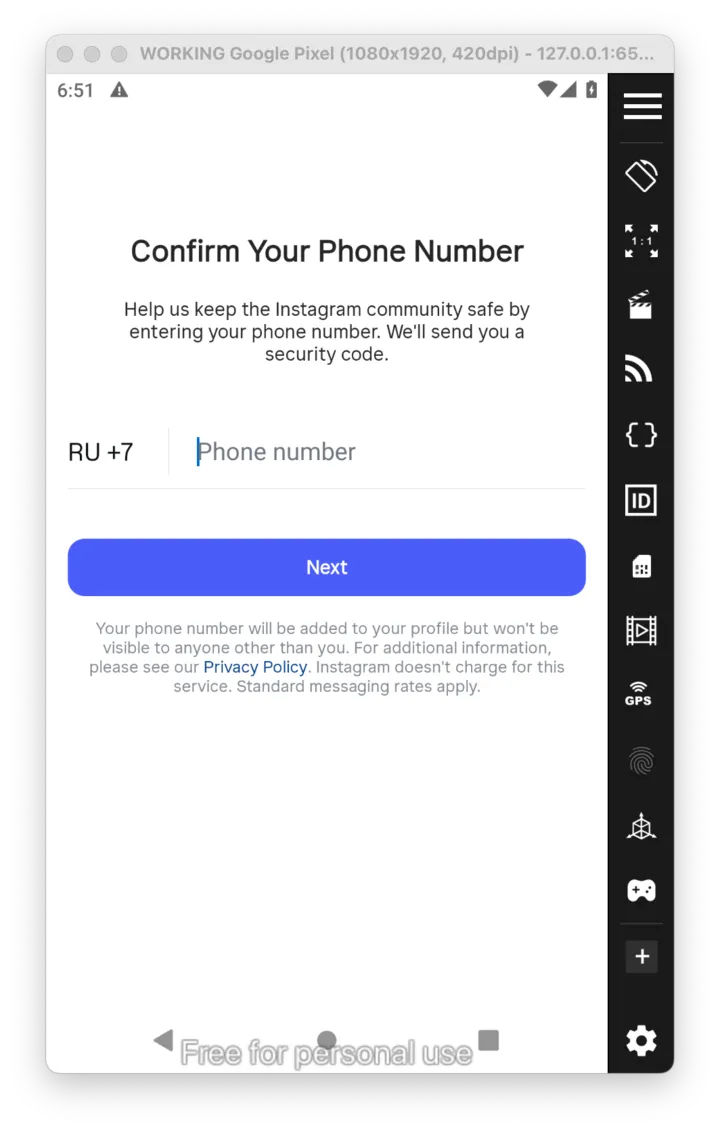 Instagram asks for a phone number:
 submitPhoneNumber(…).
ts
// Give Instagram a phone number.
const submitPhoneNumber = (screen: ChallengeOutcome, phoneNumber: string) =>
  Effect.gen(function* () {
    if (!ChallengeSubmitPhoneScreen.is(screen)) return screen;
    return yield* screen.submitPhoneNumber(phoneNumber);
  });
8. Set a new password
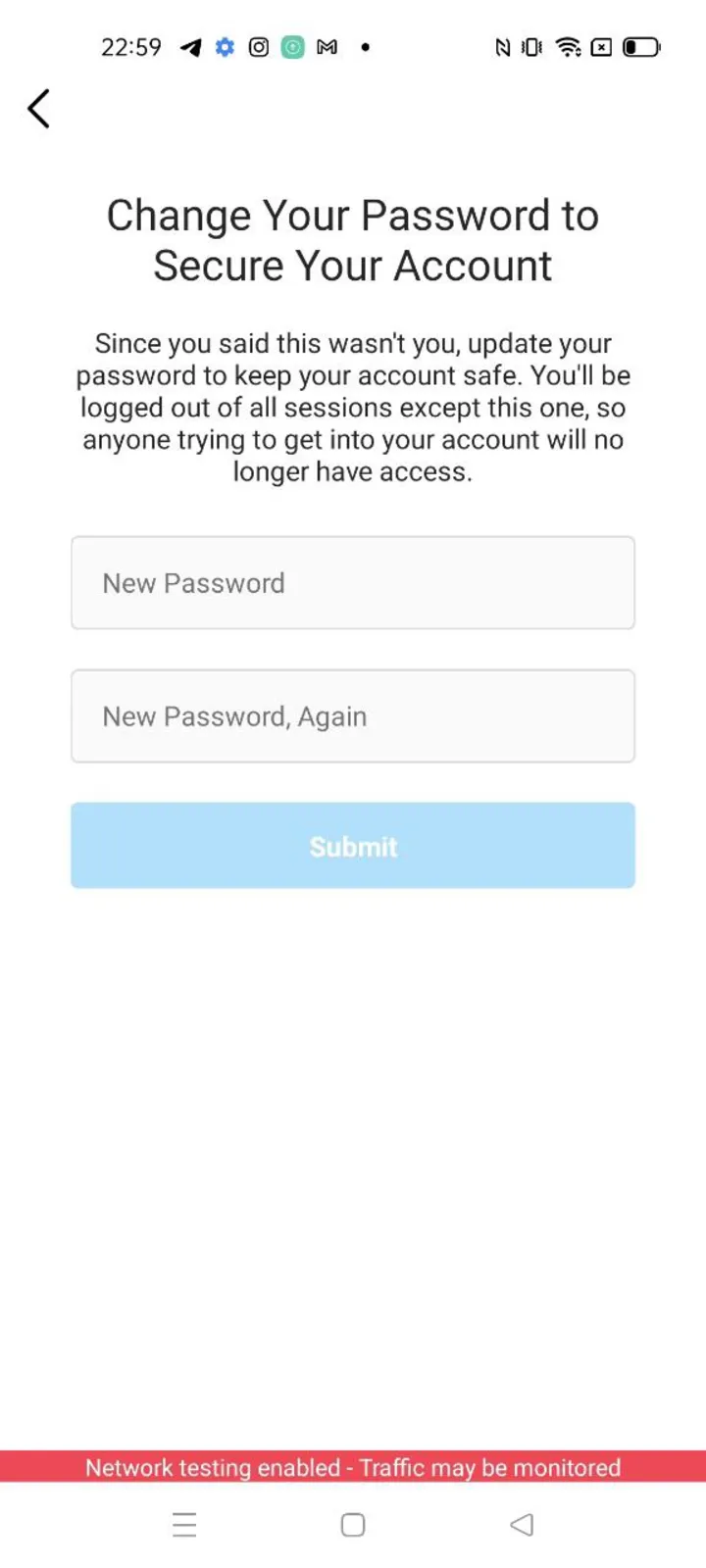 A new password is required:
 submitNewPassword(…).
ts
// Set a new password; a password that is too easy is IgChallengeNavigationSetNewPasswordTooEasyError.
const setNewPassword = (screen: ChallengeOutcome, password: string) =>
  Effect.gen(function* () {
    if (!ChallengeSetNewPasswordScreen.is(screen)) return screen;
    return yield* screen.submitNewPassword(password);
  });
9. Give an age
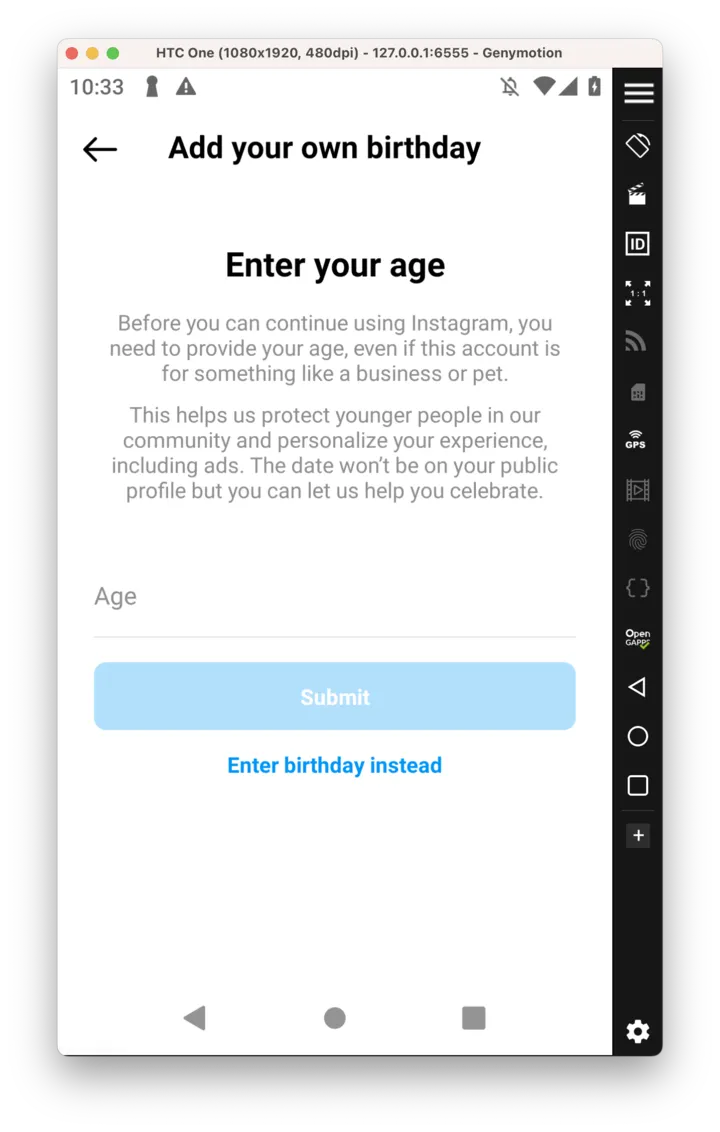 The birthday step:
 submitAge(…).
ts
// Answer the birthday step with the person's age.
const addBirthday = (screen: ChallengeOutcome, age: number) =>
  Effect.gen(function* () {
    if (!ChallengeAddBirthdayScreen.is(screen)) return screen;
    return yield* screen.submitAge(age);
  });
10. Confirm a login was yours
ts
// Review a login: "It was me".
const confirmLogin = (screen: ChallengeOutcome) =>
  Effect.gen(function* () {
    if (!ChallengeLoginReviewScreen.is(screen)) return screen;
    return yield* screen.confirmItWasMe();
  });
11. Report a login that was not yours
ts
// Review a login: "It wasn't me".
const reportLogin = (screen: ChallengeOutcome) =>
  Effect.gen(function* () {
    if (!ChallengeLoginReviewScreen.is(screen)) return screen;
    return yield* screen.reportItWasNotMe();
  });
12. Acknowledge a temporary lock
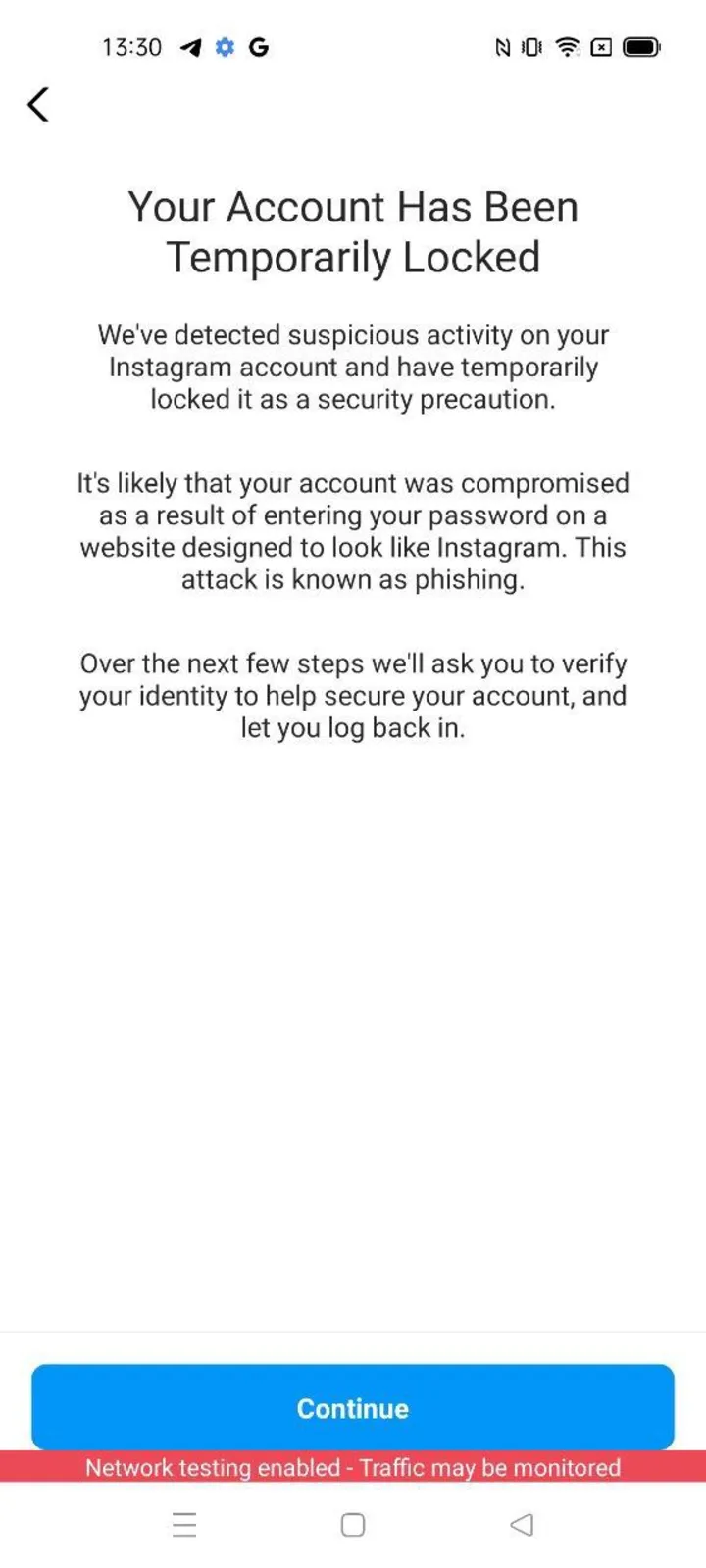 The temporary-lock notice:
 acknowledge().
ts
// Acknowledge that the account was temporarily locked.
const acknowledgeLock = (screen: ChallengeOutcome) =>
  Effect.gen(function* () {
    if (!ChallengeAccountTemporarilyLockedScreen.is(screen)) return screen;
    return yield* screen.acknowledge();
  });
13. Close the notice of a violation
ts
// Close the notice of a violation.
const closeNotice = (screen: ChallengeOutcome) =>
  Effect.gen(function* () {
    if (!ChallengeEscalationInformationScreen.is(screen)) return screen;
    return yield* screen.close();
  });
14. Confirm a changed contact point
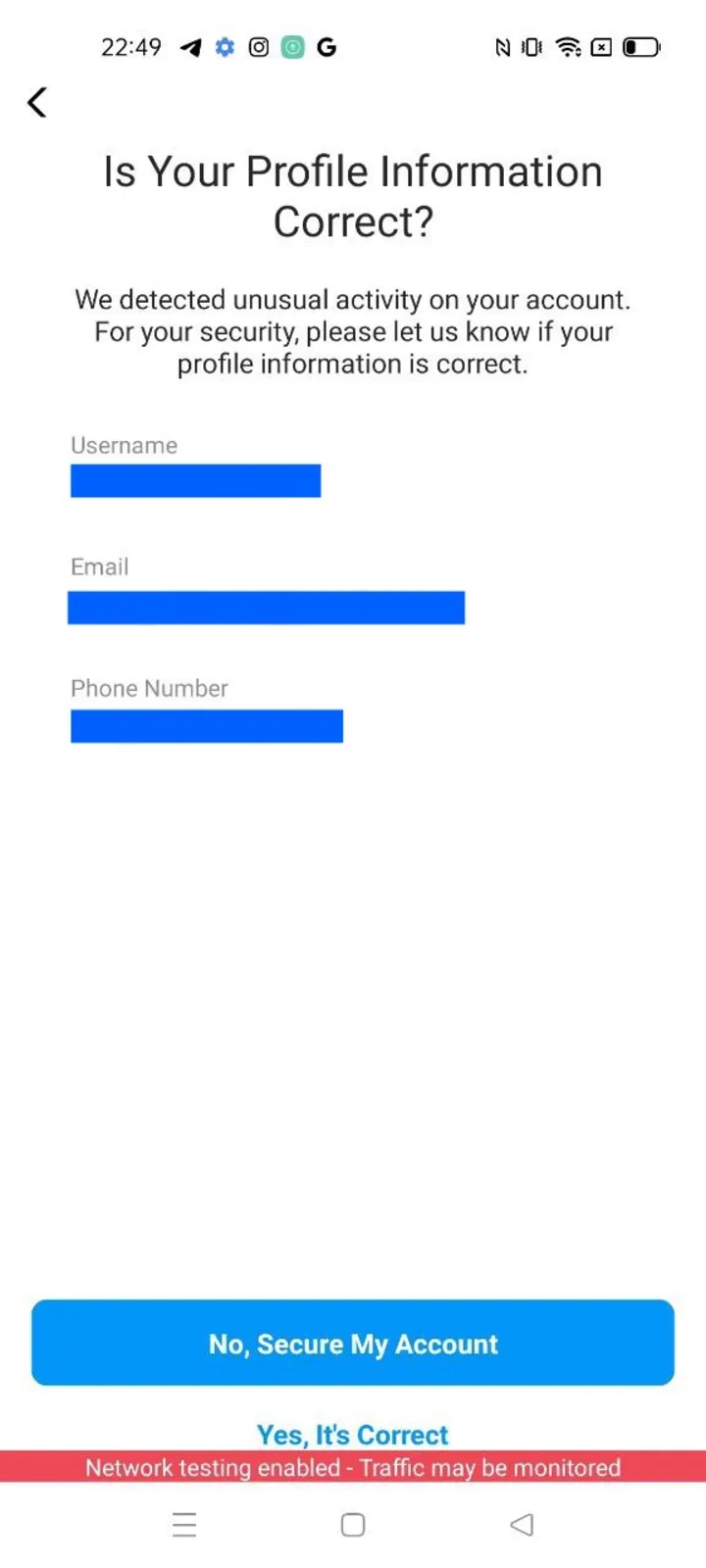 A changed contact point to confirm:
 confirmContactPoint().
ts
// Confirm that a changed contact point is correct.
const confirmContactPoint = (screen: ChallengeOutcome) =>
  Effect.gen(function* () {
    if (!ChallengeReviewContactPointChangeScreen.is(screen)) return screen;
    return yield* screen.confirmContactPoint();
  });
15. Reject a changed contact point
ts
// Reject a changed contact point: "No, secure my account" leads to the new-password step.
const rejectContactPoint = (screen: ChallengeOutcome) =>
  Effect.gen(function* () {
    if (!ChallengeReviewContactPointChangeScreen.is(screen)) return screen;
    return yield* screen.rejectContactPoint();
  });
16. Acknowledge the scraping warning
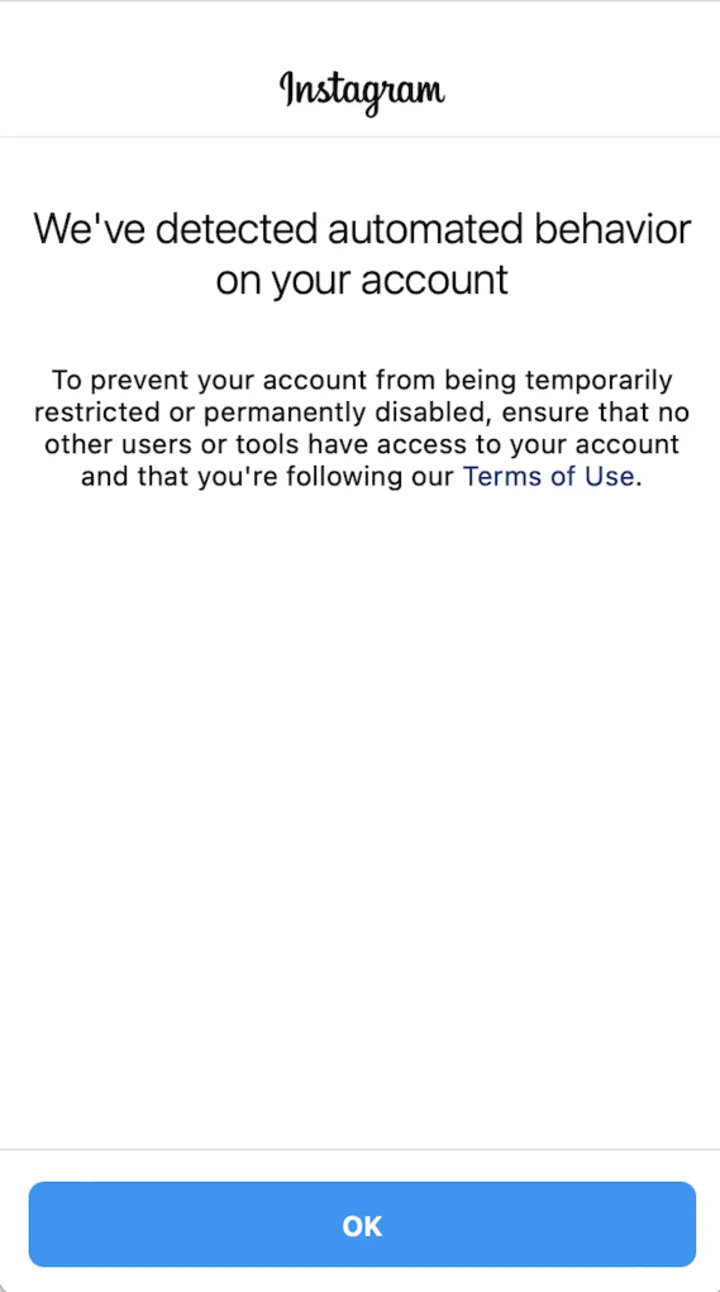 The scraping warning:
 acknowledge().
ts
// Acknowledge the scraping warning.
const acknowledgeScrapingWarning = (screen: ChallengeOutcome) =>
  Effect.gen(function* () {
    if (!ChallengeScrapingWarningScreen.is(screen)) return screen;
    return yield* screen.acknowledge();
  });
17. Solve the web reCAPTCHA
The token comes from a solving service you bring; the Simulator solves no captcha.
ts
// Send the solved token of the web challenge's reCAPTCHA form.
const solveWebRecaptcha = (screen: ChallengeOutcome, token: string) =>
  Effect.gen(function* () {
    if (!ChallengeWebRecaptchaScreen.is(screen)) return screen;
    return yield* screen.submitRecaptcha(token);
  });
18. Close the web new-password page
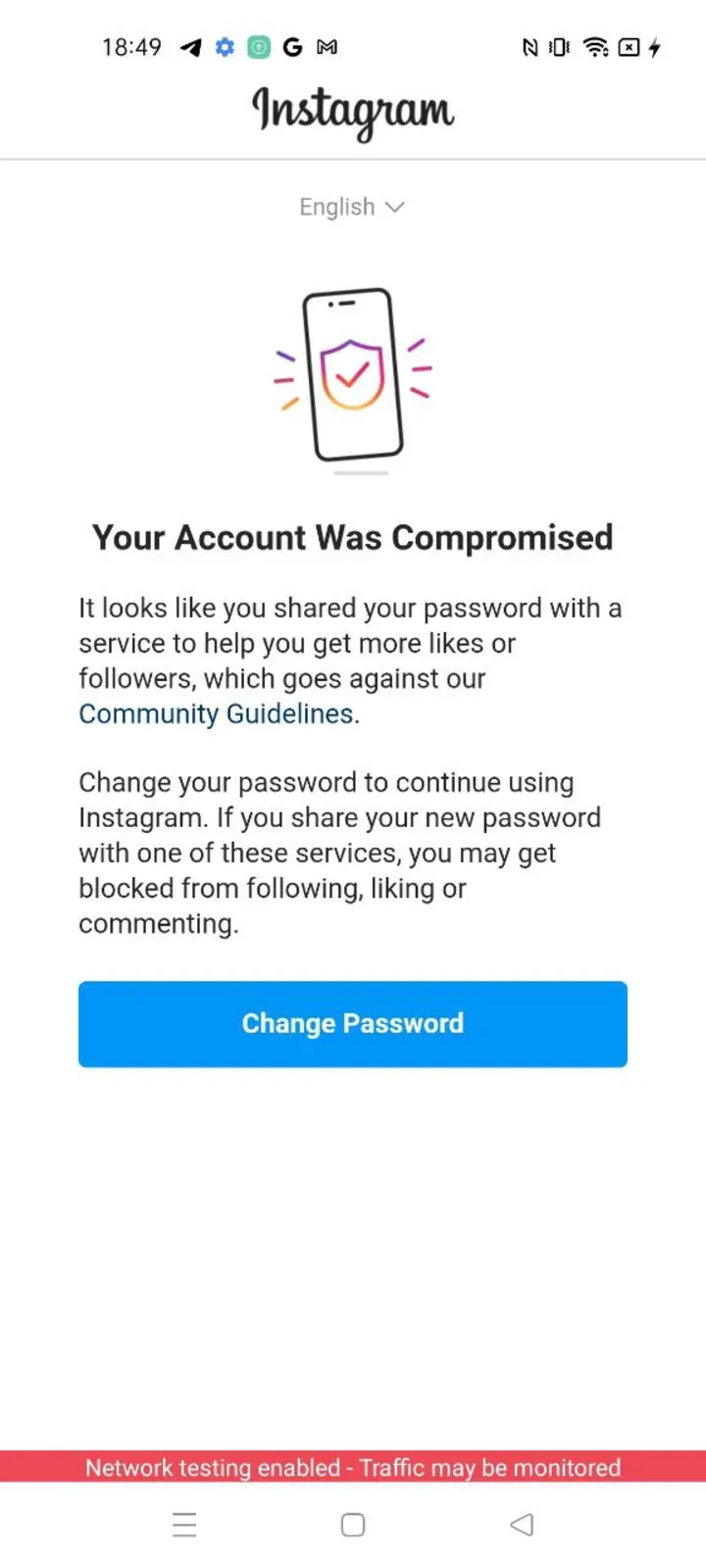 The web new-password page (compromised account):
 close().
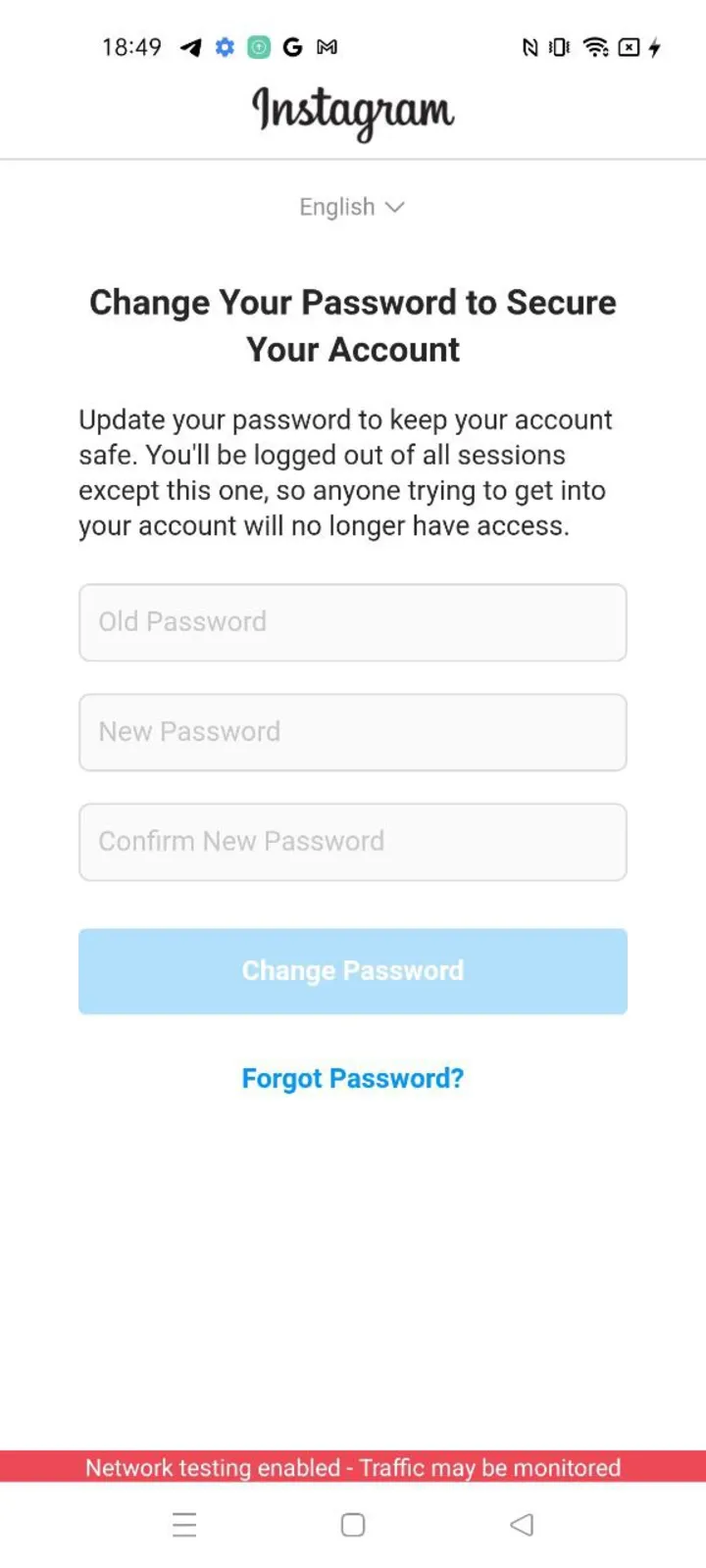 Its second step.
ts
// Close the web challenge's new-password page.
const closeWebNewPassword = (screen: ChallengeOutcome) =>
  Effect.gen(function* () {
    if (!ChallengeWebSetNewPasswordScreen.is(screen)) return screen;
    return yield* screen.close();
  });
19. Solve the text captcha
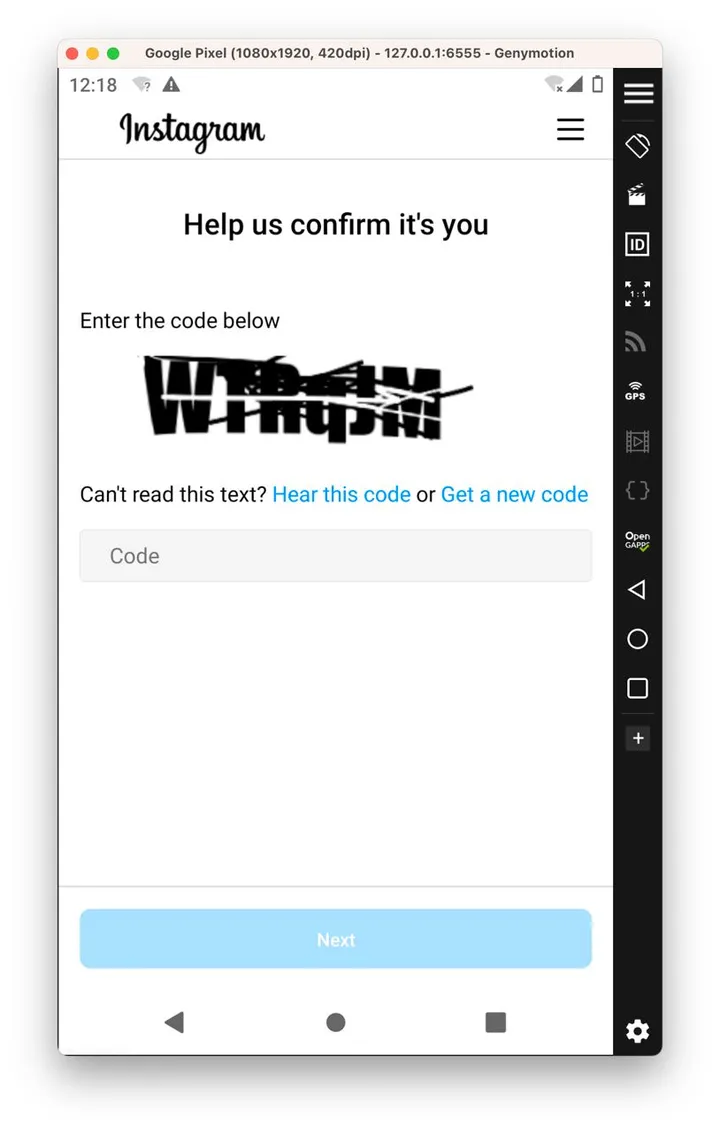 The text captcha: type the characters of the image into
 submitCaptcha(…).
ts
// Type the characters of the captcha image.
const solveTextCaptcha = (screen: ChallengeOutcome, characters: string) =>
  Effect.gen(function* () {
    if (!ChallengeTextCaptchaScreen.is(screen)) return screen;
    return yield* screen.submitCaptcha(characters);
  });
20. Ask for another captcha image
ts
// Ask for another captcha image: the answer is a new handle of the same screen, with a fresh image.
const changeCaptchaImage = (screen: ChallengeOutcome) =>
  Effect.gen(function* () {
    if (!ChallengeTextCaptchaScreen.is(screen)) return screen;
    return yield* screen.changeImage();
  });
21. Solve the reCAPTCHA step
The screen's data.siteKey is the key to solve, together with the page address; give both to your solving service and pass the token it returns to submitRecaptcha(token). The Simulator solves no captcha.
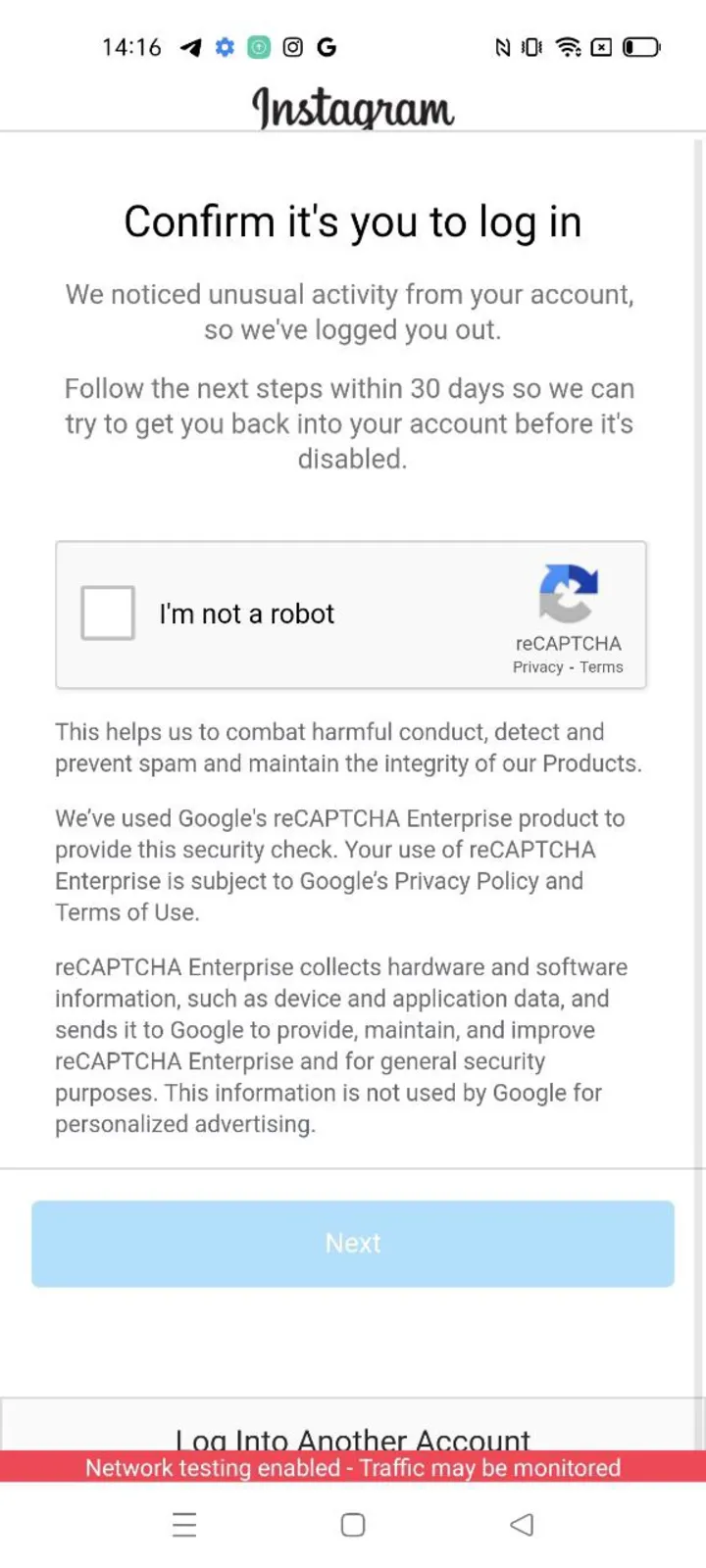 "Confirm it's you": solve with
 data.siteKey, then submitRecaptcha(token).
ts
// Send the solved token of the "Confirm it's you" reCAPTCHA step.
const solveRecaptcha = (screen: ChallengeOutcome, token: string) =>
  Effect.gen(function* () {
    if (!ChallengeRecaptchaScreen.is(screen)) return screen;
    return yield* screen.submitRecaptcha(token);
  });
22. Give the contact point to confirm
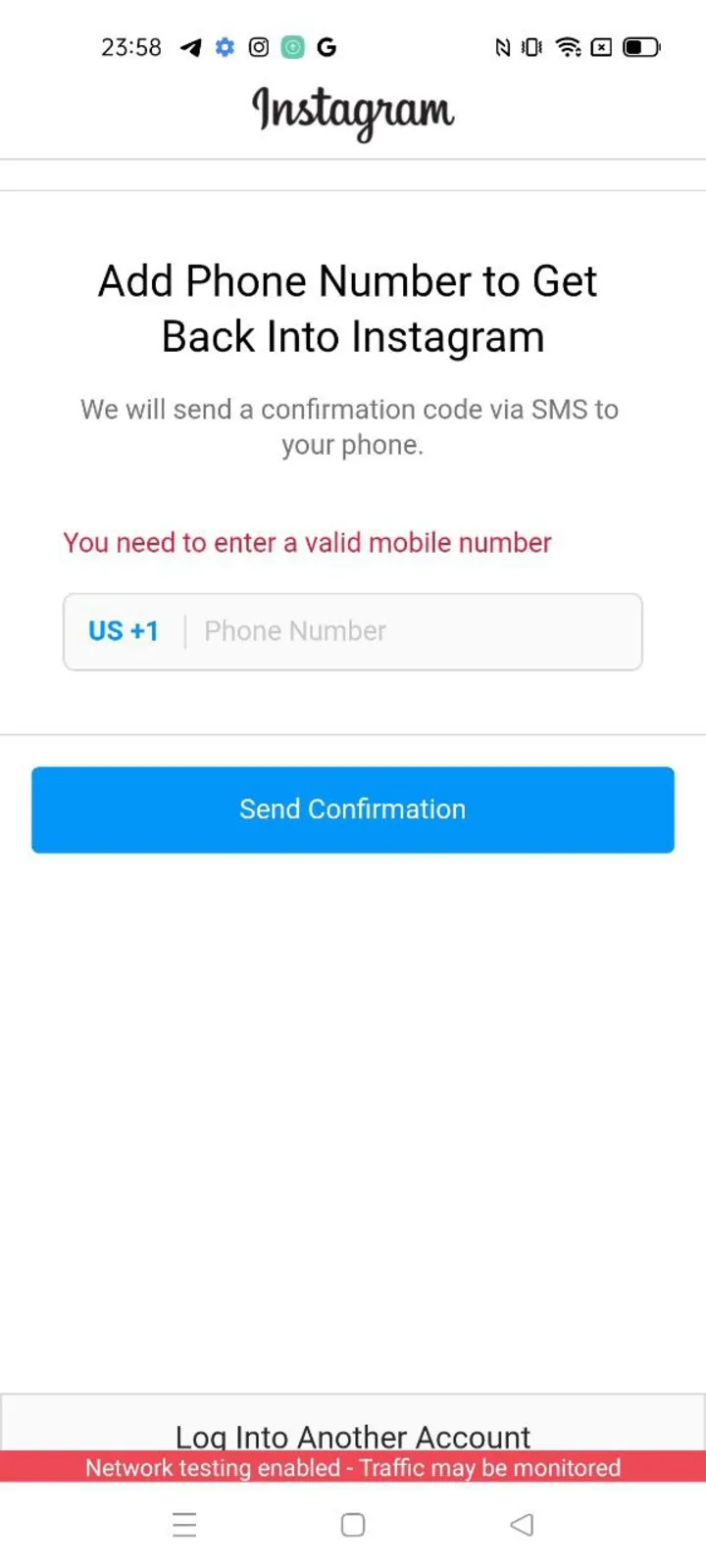 Instagram asks for a contact point:
 submitContactPoint(…).
ts
// Give Instagram the contact point to confirm: a phone number or an email address.
const submitContactPoint = (screen: ChallengeOutcome, contactPoint: string) =>
  Effect.gen(function* () {
    if (!ChallengeSetContactPointScreen.is(screen)) return screen;
    return yield* screen.submitContactPoint(contactPoint);
  });
23. Enter the confirmation code
ts
// Enter the confirmation code Instagram sent to the contact point.
const enterConfirmationCode = (screen: ChallengeOutcome, code: string) =>
  Effect.gen(function* () {
    if (!ChallengeContactPointCodeScreen.is(screen)) return screen;
    return yield* screen.submitCode(code);
  });
24. Ask for a new confirmation code
ts
// Ask for a new confirmation code: the same step with fresh issued values.
const resendConfirmationCode = (screen: ChallengeOutcome) =>
  Effect.gen(function* () {
    if (!ChallengeContactPointCodeScreen.is(screen)) return screen;
    return yield* screen.resendCode();
  });
25. Change the contact point
ts
// Change the contact point: one step back, usually to the contact-point prompt.
const changeContactPoint = (screen: ChallengeOutcome) =>
  Effect.gen(function* () {
    if (!ChallengeContactPointCodeScreen.is(screen)) return screen;
    return yield* screen.changeContactPoint();
  });
26. Start the video selfie
The selfie asks for a video that the person records with the phone's camera, and this screen has no action that sends one. A program cannot pass the video selfie: stop the account and let its owner pass it.
ts
// Start the video selfie of the authenticity wizard.
const startVideoSelfie = (screen: ChallengeOutcome) =>
  Effect.gen(function* () {
    if (!ChallengeAuthenticityWizardScreen.is(screen)) return screen;
    return yield* screen.startVideoSelfie();
  });
27. Upload the identity-verification photo
The photo is the bytes of an image you hold (a document photo of the account's owner), not something the Simulator takes.
ts
// Upload the identity-verification photo the wizard asks for (base64 or raw bytes).
const uploadIdentityPhoto = (screen: ChallengeOutcome, photo: Uint8Array) =>
  Effect.gen(function* () {
    if (!ChallengeAuthenticityWizardScreen.is(screen)) return screen;
    return yield* screen.uploadIdentityVerificationPhoto(photo);
  });
28. Wait for the wizard's review
The caller owns the pace; the Simulator never polls by itself.
ts
// Poll the review of the wizard once; the caller owns the pace.
const pollWizardReview = (screen: ChallengeOutcome) =>
  Effect.gen(function* () {
    if (!ChallengeAuthenticityWizardScreen.is(screen)) return screen;
    // `{ status: 'still-waiting' }` leaves this screen in front; anything else is the next step.
    const check = yield* screen.checkReviewStatus();
    return 'status' in check ? screen : check;
  });
29. Wait for the account review
ts
// Poll the awaiting-review step once while Instagram reviews the account.
const pollReview = (screen: ChallengeOutcome) =>
  Effect.gen(function* () {
    if (!ChallengeAwaitingReviewScreen.is(screen)) return screen;
    // `{ status: 'still-waiting' }` leaves this screen in front; anything else is the next step.
    const check = yield* screen.checkReviewStatus();
    return 'status' in check ? screen : check;
  });
30. Close "thanks for providing info"
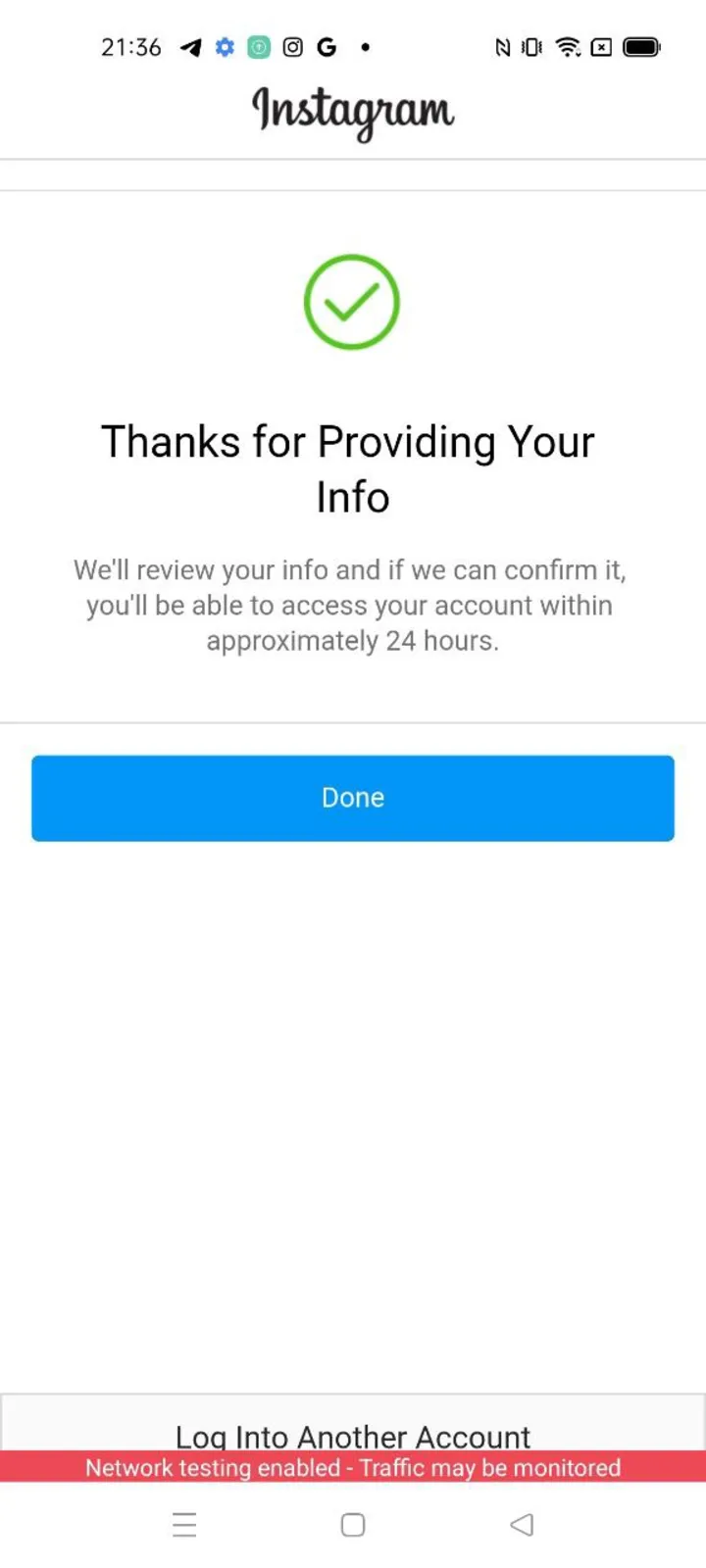 "Thanks for providing info":
 close().
ts
// Close the "thanks for providing info" step.
const closeThanks = (screen: ChallengeOutcome) =>
  Effect.gen(function* () {
    if (!ChallengeThanksForProvidingInfoScreen.is(screen)) return screen;
    return yield* screen.close();
  });
31. Disagree with a suspension
ts
// Disagree with the decision that suspended the account.
const disagreeWithSuspension = (screen: ChallengeOutcome) =>
  Effect.gen(function* () {
    if (!ChallengeAccountSuspendedScreen.is(screen)) return screen;
    return yield* screen.disagreeWithDecision();
  });
32. Read how the challenge ended
ts
// Read how the challenge ended.
const endOf = (outcome: ChallengeOutcome) => {
  if (ChallengeClosed.is(outcome)) {
    // The interrupted screen is in front again. `OpenChallenge` never retries the
    // action: take it again on this handle (an entry's `otherwise` is what runs
    // the failed effect again).
    return { screen: outcome.screen.id };
  }
  if (ChallengeClosedBeforeLaunch.is(outcome)) {
    // The launch itself was interrupted: launch again from the snapshot the challenge left.
    return { snapshot: outcome.snapshot };
  }
  // Another challenge step.
  return { next: outcome.id };
};