Appearance
The gallery picker
What the person sees. The composer's "+" opens the device's gallery over the conversation: the person's photos in a grid, with the story camera and the Imagine tile above it.
What you do. You open the picker (DirectMediaPickerPhotosScreen) from a conversation (thread.openMediaPicker()) and send what the person picked: sendPhoto({ file }) uploads the picture and broadcasts photo_attachment in one step, and sendVideo({ file }) reads the file's facts, asks the server for its upload settings, encodes the video the server's directive asks for, uploads the encoded file and broadcasts video_attachment. The app stays on the picker after a send; so does the screen.
The video's settings describe the source the app was given, before the encode (width, height, frame rate, the file's size and its frames' mean size), and the process's own facts: the battery reading and the network measurement the recording declares. The settings carry the bandwidth estimator's figures and not the transport's tigon_network_info block, which only the posting surfaces' recordings hold. The encoded file is uploaded to messenger_video the slot-then-file way, named after its own hash, size and two times, and the broadcast's video_result and attachment_fbid are the uploaded media's id.
Opening the picker sends the grid's own IGMetaMediaCloudAppsQuery while the conversation is still in front; the answer lists the cloud apps the grid offers, and the Simulator reads none of it — it never reads the person's own gallery, so a send takes the file's bytes.
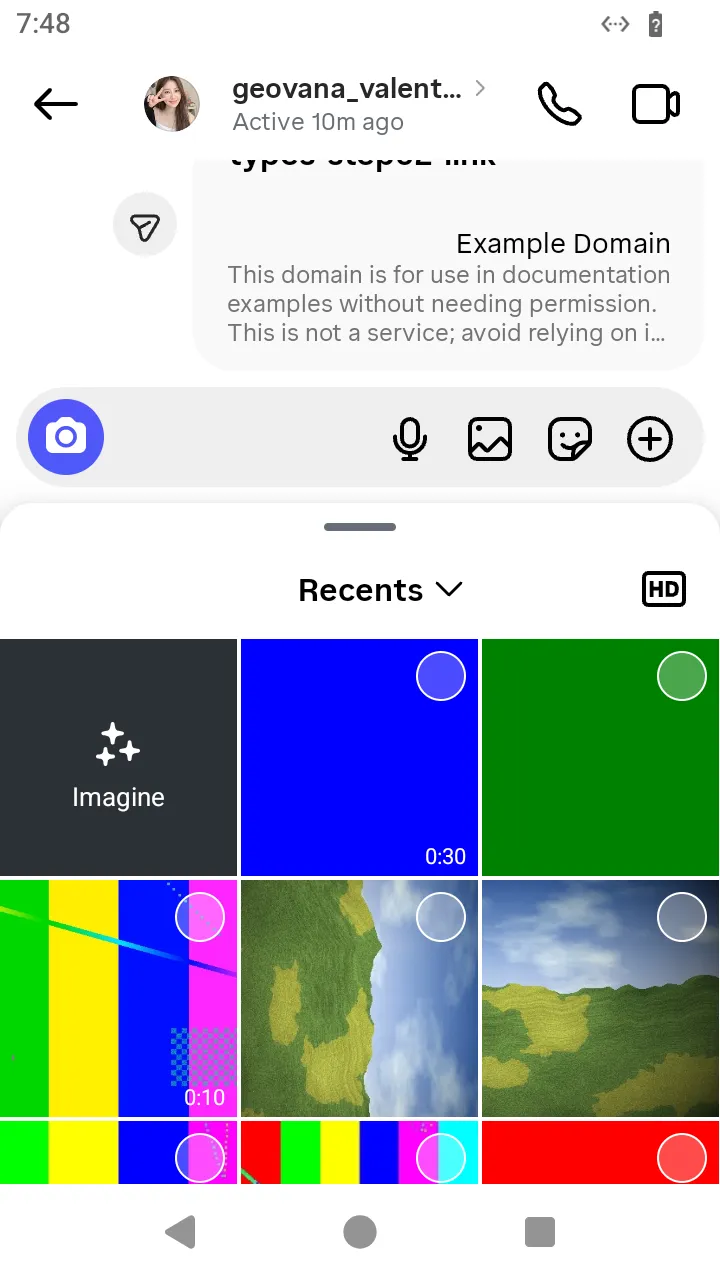 The picker opened from the composer:
thread.openMediaPicker().
ts
// Open the composer's gallery picker and send the photo the person picked.
const picture = await readFile('photo.jpg');
const photo = await AndroidIgpapi.launch({
  checkpoint: saved,
  screen: FeedTimelineScreen,
  main: feed =>
    Effect.gen(function* () {
      const tab = yield* feed.openDirectTab();
      const item = tab.threads[0];
      if (item === undefined) return undefined;
      const thread = yield* item.open();
      const picker = yield* thread.openMediaPicker();
      if (!DirectMediaPickerPhotosScreen.is(picker)) return undefined;
      return yield* picker.sendPhoto({ file: picture });
    }),
});
console.log(photo);
What this screen does not offer
The story camera and the Imagine tile above the grid: the app has them, the Simulator has no action for them yet. A photo picked from the conversation's details, or a send the picker defers while the person keeps browsing, are the same path with another entry.